Modern applications are distributed, ephemeral and built from a dozen moving parts. To keep them reliable, you need real visibility: not just “is the server up?”, but “how is this request behaving, right now, across every component it touches?”.
The good news is that the observability world has converged on a handful of open standards. The slightly confusing news is that there are several of them — Prometheus, OpenMetrics, OpenTelemetry, StatsD, Graphite, NRPE — and it isn’t always obvious which one to reach for. They overlap in places, they come from different eras, and each was designed to solve a specific problem well.
This article is a field guide. We’ll explain what each protocol actually is, how its data model works, and the use cases it’s best at — so you can pick the right tool for each signal. Then we’ll close on how Bleemeo speaks all of them through a single agent, so adopting standards doesn’t mean running six different pipelines.
Why standards matter more than tools
Every monitoring vendor wants you to install their agent, emit their metric format and query with their query language. It works — until the day you want to switch, add a second backend, or simply hire someone who already knows the tooling. Then the cost of that proprietary glue becomes very real. (It’s the reason we built Bleemeo on open standards in the first place.)
Open standards flip the equation:
- Portability — instrument your code once against OpenTelemetry or expose a Prometheus endpoint, and your telemetry is no longer tied to a single backend.
- Leverage existing skills — PromQL, OTLP and StatsD are everywhere. Your team probably already knows them, and so does your next hire.
- A rich ecosystem — thousands of Prometheus exporters and OpenTelemetry instrumentation libraries exist today. Standards let you reuse all of them.
- No lock-in — if a tool stops serving you, you keep your instrumentation and move on.
So which standard for which job? First, a quick map of the territory.
The four signals you actually monitor
Before the protocols, the signals. Almost everything you collect falls into one of four buckets, and knowing which one you need points you straight at the right standard:
- Metrics — numbers over time (request rate, CPU, queue depth). Cheap to store, perfect for dashboards and alerts. Answers: what is happening?
- Logs — timestamped text records of discrete events. Answers: why did it happen?
- Traces — the path of a single request across services, with timing at each hop. Answers: where is the time going?
- Status checks — a simple healthy / warning / critical verdict. Answers: is this thing OK right now?
Each protocol below is, at heart, a way to carry one or more of these signals. Metrics are the most contested space (several standards do it); logs and traces are mostly OpenTelemetry’s domain; status checks are Nagios/NRPE territory.
How we got here: a short timeline
These protocols didn’t appear together — they’re snapshots of how monitoring evolved from single servers to cloud-native fleets. That history explains a lot about their design.
Notice the shift: the early protocols (Graphite, StatsD) push simple, flat data; the cloud-native era (Prometheus) flipped to pull with rich labels; and OpenTelemetry finally unified all three signals under one standard. Let’s look at each in turn.
A field guide to the monitoring protocols
A useful way to keep these straight is to ask three questions about each one:
- What signal does it carry? Metrics, logs, traces, or status checks.
- Pull or push? Does a collector scrape the data on its own schedule (pull), or does the application send it the moment something happens (push)?
- What’s its data model? Flat dotted names, dimensional labels, exit codes…
Keep those three in mind and the differences below fall into place quickly. The push vs pull question in particular is the fault line that separates the protocols — it’s worth one picture:
Same two boxes, opposite arrows: in pull the collector reaches out to your app on its own schedule; in push your app sends the moment something happens. Everything else is detail.
Prometheus — the de-facto standard for metrics
Prometheus came out of SoundCloud around 2012 and became the second project to graduate from the CNCF, right after Kubernetes. Today it’s the default language of cloud-native metrics.
The model is deliberately simple and pull-based: your application (or an exporter
sitting next to it) exposes a plain-text /metrics HTTP endpoint, and a collector scrapes
it on an interval.
# HELP http_requests_total Total HTTP requests.
# TYPE http_requests_total counter
http_requests_total{method="GET",status="200"} 14834
http_requests_total{method="GET",status="500"} 12
The power is in that {method="GET",status="200"} part: metrics are dimensional, with
labels you can slice and aggregate. You query them with PromQL, a language built for
exactly that:
# 95th percentile request latency over 5 minutes
histogram_quantile(0.95, sum(rate(http_request_duration_seconds_bucket[5m])) by (le))- Carries: metrics. Model: pull (scrape).
- Best for: cloud-native services and infrastructure, dashboards, and PromQL-based alerting. The foundation of the RED method (Rate, Errors, Duration) and USE method (Utilization, Saturation, Errors).
- Watch out for: pull means the target must be reachable and long-lived enough to be scraped — short-lived batch jobs need a push gateway or a different protocol.
OpenMetrics — is it the same as Prometheus?
Almost. If Prometheus is the format everyone uses, OpenMetrics is that format written down as a vendor-neutral specification. It takes the Prometheus text exposition format and turns it into a formal standard so that any tool — not just Prometheus — can produce and consume it with confidence. The two are intentionally close, and Prometheus scrapers read OpenMetrics natively; the standard’s work is now being consolidated back into the Prometheus project itself.
Prometheus vs OpenMetrics, then, isn’t really a versus: what OpenMetrics adds is mostly
rigor and a few useful extras — explicit units, a required _total suffix for counters, an
# EOF terminator, and exemplars (attaching a trace ID to a metric sample, so a latency
spike links straight to an example trace).
- Carries: metrics. Model: pull (same as Prometheus).
- Best for: anyone exposing or scraping Prometheus-style metrics — which is to say,
most of the ecosystem. In practice “supports Prometheus” and “supports OpenMetrics” mean
the same thing for your
/metricsendpoint. - Watch out for: it’s not a different thing to learn. If you know the Prometheus format, you already know OpenMetrics.
Graphite — the push-based predecessor
Graphite predates the cloud-native wave (it was open-sourced by Orbitz around 2008) and a lot of monitoring stacks were built on it. It’s push-based and gloriously simple: send one line per data point over TCP.
servers.web01.requests.count 42 1718000000That’s it — a dotted hierarchical name, a value, and a Unix timestamp. Graphite stores it in fixed-size, RRD-style files (Whisper) and renders graphs from the dotted tree.
- Carries: metrics. Model: push (line protocol over TCP).
- Best for: dead-simple emission from anything that can open a socket, and existing estates already built around the Graphite line format. It pairs classically with StatsD, which historically flushed its aggregates into Graphite.
- Watch out for: the dotted naming has no native labels (tags were bolted on later), so high-cardinality data leads to a sprawling metric tree. It’s the previous generation’s answer to what Prometheus now does with dimensional labels — still useful, especially for migrations, but rarely the choice for a greenfield stack.
StatsD — fire-and-forget custom and business metrics
Not every metric comes from an exporter. Sometimes you just want your application to fire “this happened” from inside the code — a checkout completed, a job processed, a cache miss. StatsD (born at Etsy around 2011) was built for exactly that.
It’s push-based over UDP: the client sends a tiny packet and moves on, never waiting for a reply. The line format is trivially easy to emit from any language — or even the shell:
orders.completed:1|c     # a counter: +1
request.latency:217|ms   # a timer, in milliseconds
queue.depth:48|g         # a gauge: current value
A StatsD server aggregates these over a flush interval and forwards the result. Because the client just fires UDP packets, instrumentation is almost free and can’t slow your app down. (We once used it to monitor a Minecraft server — it really is that quick to wire up.)
- Carries: metrics (counters, timers, gauges, sets). Model: push (UDP).
- Best for: custom and business metrics emitted straight from application code, and short-lived work where a scrape would never catch the event. The fastest path from “I wish I tracked this” to a graph.
- StatsD vs Prometheus: reach for StatsD when your code wants to push an event as it happens; reach for Prometheus when a collector should pull the current state of a long-running service. Most stacks use both.
- Watch out for: UDP can drop packets under load (a deliberate trade for speed), and aggregation happens server-side, so you reason about rates rather than raw events.
OpenTelemetry (OTLP) — the unifying standard
OpenTelemetry (the merger of OpenTracing and OpenCensus, now a CNCF project second in activity only to Kubernetes) is the most ambitious of the bunch. Its goal is one vendor-neutral standard for all three pillars at once — metrics, logs and traces — with a single set of SDKs, a wire protocol (OTLP, over gRPC or HTTP), and a Collector for routing and processing.
It’s push-based: you instrument your code with the OpenTelemetry SDK, and it exports telemetry to any OTLP-compatible endpoint. Crucially, traces are first-class here — this is the standard way to follow one request across every service it touches.
One common misconception is worth clearing up: OpenTelemetry is not a backend. It standardizes how telemetry is produced and moved — the SDKs, the OTLP protocol, and an optional Collector that runs a pipeline of receivers → processors → exporters to batch, filter and route data. It deliberately stops before storage and querying: you still choose where the data lands (Prometheus for metrics, a tracing backend, Bleemeo, or several at once). That separation is the entire point — your instrumentation stays portable while the backend remains a decision you can change later.
- Carries: metrics, logs and traces. Model: push (OTLP/gRPC or HTTP).
- Best for: instrumenting applications once against a single standard and keeping the freedom to send anywhere; distributed tracing in particular; future-proofing a stack you don’t want to re-instrument later.
- Does OpenTelemetry replace Prometheus? Not really — they’re complementary. Many teams expose Prometheus metrics and ship logs/traces over OTLP. OpenTelemetry even speaks Prometheus on the metrics side, so the two coexist happily.
- Watch out for: it’s the most powerful and therefore the heaviest to adopt fully. Many teams start with one signal (traces or logs) and grow into the rest — which is fine, since OTLP lets you adopt the pieces you need.
NRPE & Nagios plugins — battle-tested status checks
Standards aren’t only about the latest protocols — they’re also about not throwing away
what already works. Nagios (1999) defined a check model that’s
still everywhere: a plugin is just an executable that returns an exit code — 0 OK,
1 WARNING, 2 CRITICAL, 3 UNKNOWN — plus a line of human-readable text and optional
performance data.
OK - load average: 0.42, 0.31, 0.28 | load1=0.42;1.0;2.0NRPE (Nagios Remote Plugin Executor) is the pull-style transport that lets a central Nagios server run those checks on remote hosts. Thousands of plugins exist for everything from disk space to certificate expiry.
- Carries: status checks (health, not time-series). Model: pull (the server queries the host).
- Best for: “is this thing healthy right now?”, and reusing a large existing library of Nagios plugins without rewriting them — the perfect bridge during a gradual migration.
- Watch out for: it’s check-oriented (pass/warn/fail), not rich, queryable time-series. Use it alongside metrics rather than instead of them.
At a glance: which protocol for what?
Six protocols, a few overlapping jobs. Here’s the whole landscape in one table:
| Protocol | Signals | Push / Pull | Data model | Best for |
|---|---|---|---|---|
| Prometheus | Metrics | Pull | Dimensional labels + PromQL | Cloud-native metrics, dashboards, alerting |
| OpenMetrics | Metrics | Pull | Prometheus format, standardized | Interop & exemplars on any /metrics endpoint |
| Graphite | Metrics | Push | Dotted hierarchical names | Legacy estates, ultra-simple line emission |
| StatsD | Metrics | Push (UDP) | Counters / timers / gauges | Custom & business events from app code |
| OpenTelemetry (OTLP) | Metrics, logs, traces | Push | Unified, vendor-neutral SDK | Standardized instrumentation, distributed tracing |
| NRPE / Nagios | Status checks | Pull | Exit code + perfdata | Health checks, reusing existing plugins |
A few patterns fall out of that table:
- Pull protocols (Prometheus, OpenMetrics, NRPE) let the collector work on its own schedule — tidy for long-running services and infrastructure.
- Push protocols (StatsD, Graphite, OTLP) let your app emit the instant something happens — ideal for short-lived jobs and business events.
- Metrics are well served by several standards; logs and traces are really OpenTelemetry’s territory; status checks are NRPE’s.
Choosing in practice
You rarely pick just one. A healthy stack usually combines them:
- Exposing service metrics? Prometheus / OpenMetrics.
- Firing a business event from code (orders, signups, cache misses)? StatsD.
- Shipping logs and traces from instrumented apps? OpenTelemetry.
- Have years of Nagios checks you trust? NRPE, kept running.
- Migrating off an old Graphite setup? Keep speaking Graphite while you move.
The only real mistake is letting a vendor turn any of these into a proprietary format you can’t take with you.
How Bleemeo fits: one agent, every standard
Here’s the catch with embracing standards: taken literally, “support six protocols” sounds like running six pipelines. It isn’t — at least not with Bleemeo. Instead of inventing yet another agent protocol, we speak the standards you already use. Glouton, our open-source agent, is essentially a standards hub: it ingests Prometheus/OpenMetrics, OpenTelemetry (OTLP), StatsD, Graphite and NRPE, and forwards everything to the Bleemeo Cloud platform.
Open standards in, one open-source agent in the middle, your platform out — and not a single proprietary format along the way (the diagram shows a representative set).
There’s no “Bleemeo format” anywhere in that picture. Concretely, here is how each standard
maps to a few lines of Glouton config — small files dropped into /etc/glouton/conf.d/.
Prometheus / OpenMetrics — point the agent at any exporter; no Prometheus server to run:
# /etc/glouton/conf.d/50-prometheus-metrics.conf
metric:
  prometheus:
    targets:
      - url: "http://localhost:8080/metrics"
        name: "my_application"
You then query everything with standard PromQL. If you’d rather not operate Prometheus at all, that’s the idea behind Prometheus in the Cloud.
StatsD — an embedded server is enabled out of the box on UDP 8125, so a one-liner from any language (or the shell) becomes a metric:
echo "orders.completed:1|c" | nc -u -w0 127.0.0.1 8125OpenTelemetry (OTLP) — Glouton exposes gRPC and HTTP receivers (on by default, bound to
localhost), so an app already instrumented with the OTel SDK just points its exporter at
the agent:
# OTLP receivers (enabled by default)
log:
  opentelemetry:
    grpc: { enable: true, address: localhost, port: 4317 }   # OTLP/gRPC
    http: { enable: true, address: localhost, port: 4318 }   # OTLP/HTTP
Glouton also tails plain file, container and system logs and can
turn log patterns into metrics (counting
5xx responses straight from an access log, say), feeding Bleemeo’s
centralized log management.
NRPE / Nagios — Glouton answers NRPE requests like any daemon, so existing checks keep running while you layer modern metrics and logs on top:
nrpe:
  enable: true
  conf_paths:
    - "/etc/nagios/nrpe.cfg"
Graphite and Telegraf, too — if you already emit the Graphite line protocol or run Telegraf, Bleemeo ingests those as well, so a migration never means a rewrite. The full list lives on the integrations page.
📖 Docs: Prometheus · PromQL · StatsD · OTLP log receivers · Nagios checks
Why this stays simple to deploy
The reason all of this is one decision, not six, is that a single agent handles every protocol:
-
One install. Register Glouton on a Linux host with a single command:
wget -qO- "https://get.bleemeo.com?accountId=<YOUR_ACCOUNT_ID>®istrationKey=<YOUR_REGISTRATION_KEY>" | shIn Kubernetes it’s a DaemonSet; the agent is the same everywhere.
-
Sensible defaults. OTLP and StatsD receivers are on the moment the agent starts, so logs and custom metrics work immediately — no extra wiring.
-
Auto-discovery. Glouton detects running services with TCP probes and instantly gives them dedicated metrics, preconfigured alerts and purpose-built dashboards — no manual config per service.
-
Opt in as you go. Need a Prometheus target, an NRPE bridge, a tighter log filter? Drop a small file into
/etc/glouton/conf.d/. Nothing else changes.
Putting it all together
Picture a typical web application. Full, standards-based application monitoring with a single Glouton agent looks like this:
- Metrics — the app exposes a Prometheus
/metricsendpoint (request rate, latency histograms, error counters). Glouton scrapes it and you alert with PromQL. - Business events — the checkout path fires a StatsD counter on every completed order, so product and engineering share the same source of truth.
- Logs & traces — the app’s OpenTelemetry SDK ships structured logs (and traces) over
OTLP to Glouton, while the reverse proxy’s access log is tailed into a
5xxrate metric. - Legacy checks — an existing NRPE check for a background daemon keeps running, now visible on the same dashboards.
Every one of those flows is an open standard. Glouton normalizes them and forwards to Bleemeo, where you get unified dashboards, alerting and long-term storage — without a single proprietary instrumentation choice. If you ever change your mind about the backend, your instrumentation comes with you.
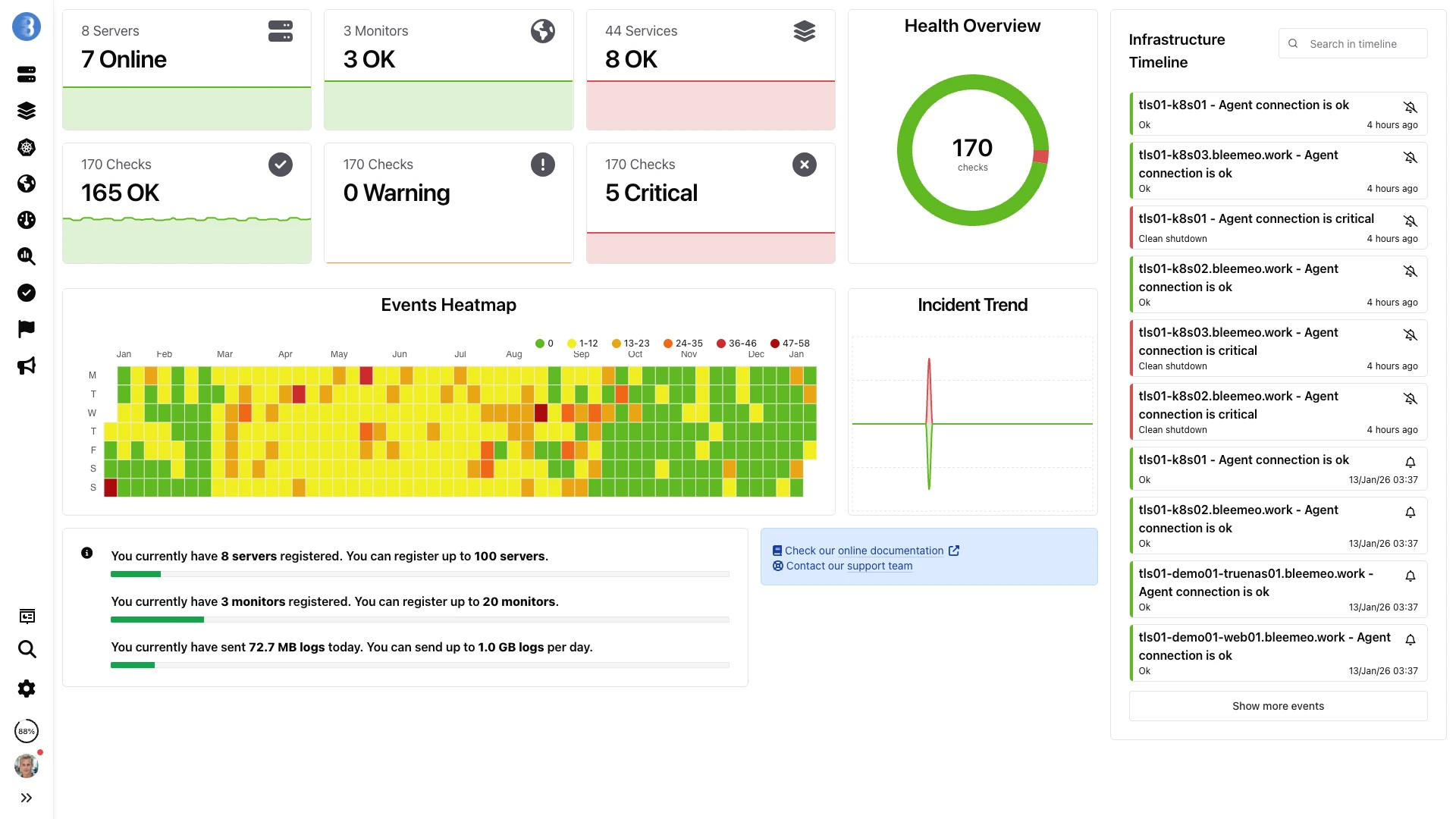
Metrics, custom events, logs and checks — whatever protocol they arrived on — land together on one Bleemeo dashboard.
Bonus: query your observability with AI
Because the data is standards-based and well-labelled, it’s also easy to expose to AI assistants. Bleemeo provides an MCP server, so tools like Claude or your IDE can answer questions like “what changed before the latency spike at 14:00?” against your real metrics and logs.
📖 Docs: Bleemeo MCP server
Monitoring protocols: frequently asked questions
Is OpenMetrics the same as Prometheus?
For your /metrics endpoint, effectively yes. OpenMetrics is the vendor-neutral standardization of the Prometheus text exposition format, with a few additions like exemplars. Prometheus scrapers read it natively, and the two are converging — so "supports Prometheus" and "supports OpenMetrics" mean the same thing in practice.
Does OpenTelemetry replace Prometheus?
No — they're complementary. OpenTelemetry standardizes how you instrument and ship metrics, logs and traces; Prometheus is the de-facto model and query language for metrics. Many teams expose Prometheus metrics and use OTLP for logs and traces. OpenTelemetry even speaks the Prometheus format on the metrics side.
What's the difference between push and pull monitoring?
With pull (Prometheus, OpenMetrics, NRPE), a collector scrapes your target on its own schedule — tidy for long-running services. With push (StatsD, Graphite, OTLP), your application sends data the moment an event happens — ideal for short-lived jobs and business events. Most real stacks use both.
StatsD vs Prometheus — when should I use each?
Use StatsD when your code wants to push a custom or business event as it happens (an order completed, a cache miss). Use Prometheus when a collector should pull the current state of a long-running service (request rates, latencies, resource usage). They complement each other rather than compete.
Is Graphite still worth using?
It's mature and still runs in many estates, but for a new stack Prometheus has largely superseded it — mainly because Prometheus uses dimensional labels where Graphite relies on dotted names that sprawl at high cardinality. Graphite remains relevant chiefly for existing deployments and migrations, which is why Bleemeo still ingests the Graphite line protocol.
Which monitoring protocol should I choose?
Match the protocol to the signal: Prometheus/OpenMetrics for service and infrastructure metrics, StatsD for in-code business events, OpenTelemetry for logs and traces, and NRPE to reuse existing Nagios checks. With Bleemeo a single Glouton agent speaks all of them, so you don't have to pick just one.
Conclusion
You don’t have to choose between “modern observability” and “not getting locked in”. Each of these protocols earns its place: Prometheus and OpenMetrics for metrics, StatsD for in-code events, OpenTelemetry for logs and traces, NRPE for the checks you already trust, and Graphite for the estates you’re migrating. Build on them and you get full visibility using skills your team already has — with no proprietary glue.
Bleemeo’s role is deliberately humble: speak every one of these standards, collect them through one open-source agent, and give you a great place to see it all.
Start monitoring your application today with a 15-day free trial — no credit card required.
Want the details? Browse the Bleemeo documentation or contact our team with your use case.