A Modern Alternative to Zabbix
Zabbix is powerful but demands significant expertise — complex trigger expressions, database tuning, and proxy management drain engineering time. Bleemeo delivers the same coverage with automatic discovery, zero database to maintain, and a modern UI your team will actually enjoy.
15-day free trial • No credit card required • No database to manage • Full support included
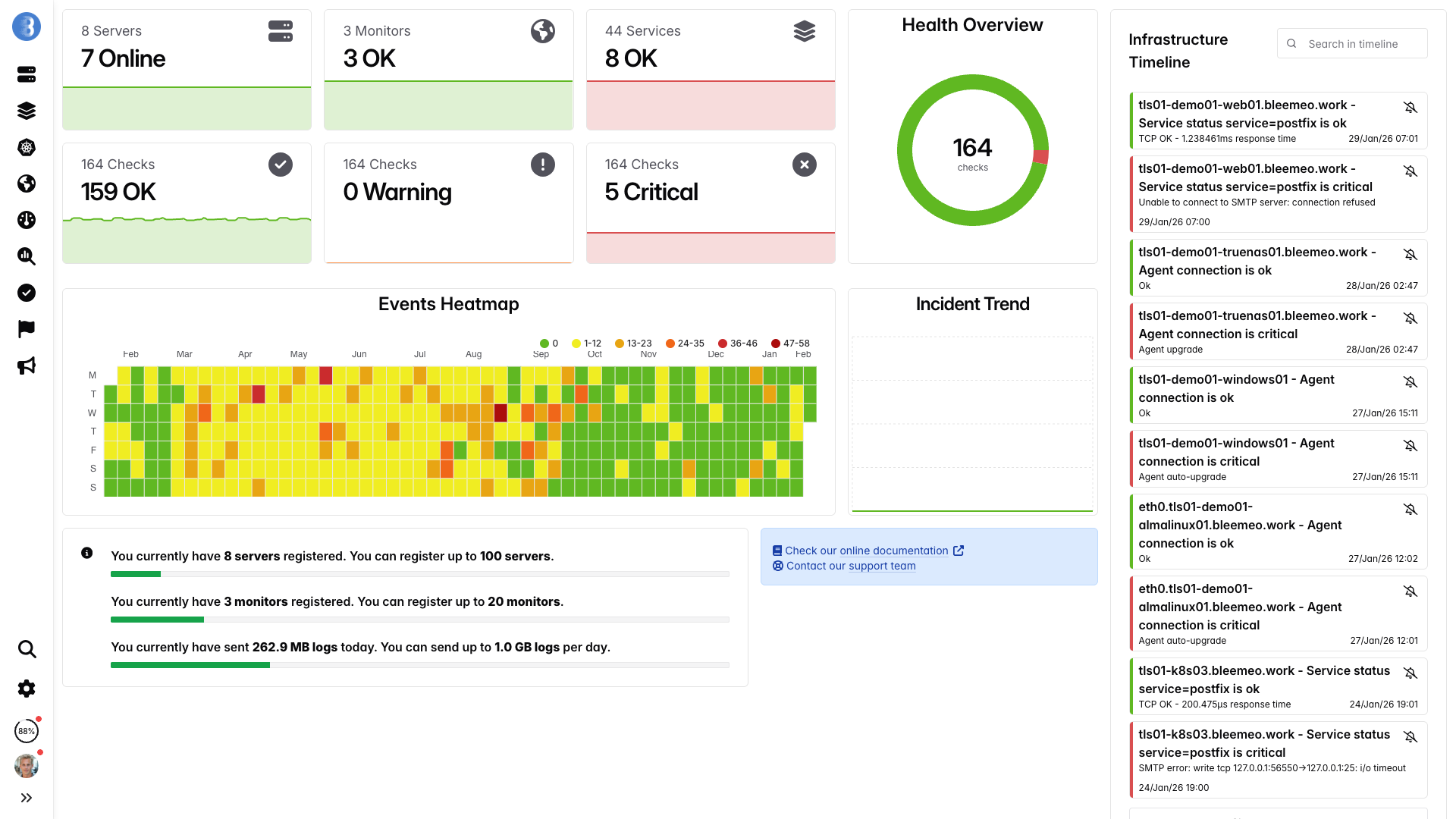
Real-time dashboards, ready in minutes — no configuration needed
Why Teams Are Moving from Zabbix
Database Complexity
Managing Zabbix's MySQL or PostgreSQL database becomes a full-time job at scale. Partitioning history and trend tables, tuning slow queries that cripple dashboard performance, and running regular housekeeper cleanup routines are constant challenges that grow with your infrastructure. Many teams discover too late that their database server needs upgrading, leading to emergency migrations and unexpected downtime during the busiest periods.
Steep Learning Curve
Zabbix's terminology — hosts, items, triggers, templates, macros, low-level discovery rules, and calculated items — along with complex workflows take weeks or even months to master. Writing correct trigger expressions with functions like last(), avg(), and nodata() requires deep domain knowledge that few engineers possess. New team members face a daunting onboarding process before they can contribute effectively, and costly training courses are often necessary to bring staff up to speed.
Limited Cloud-Native Support
Zabbix was designed for static, on-premise environments where servers are long-lived and manually provisioned. Auto-discovery in Kubernetes and dynamic cloud environments requires extensive custom scripting, external integrations, and constant template adjustments as your infrastructure evolves. Ephemeral containers and auto-scaling groups create a flood of host registrations and deregistrations that overwhelm Zabbix's host management model, leaving stale entries and broken graphs behind.
Scaling Challenges
Scaling Zabbix across multiple data centers or regions requires deploying and managing Zabbix proxies — each one another server to provision, configure, monitor, and maintain with its own local database. The proxy architecture introduces additional failure points and latency in metric collection. Large-scale deployments also demand careful database capacity planning, and exceeding your database's throughput limits results in data loss, delayed alerts, and frustrated engineers scrambling to restore service during critical incidents.
Zabbix vs Bleemeo
| Feature | Zabbix | Bleemeo |
|---|---|---|
| Database Management | MySQL/PostgreSQL tuning required | Fully managed, no DBA needed |
| Setup Complexity | Server, database, web server config | One-line agent install |
| Configuration | Templates, items, triggers, macros | Automatic service discovery |
| Scalability | Requires proxies, partitioning | Automatic, unlimited scaling |
| Kubernetes Support | Limited, requires custom discovery | Native integration built-in |
| Alerting | Basic, can cause alert storms | ML-based with smart grouping |
| Mobile Experience | Web UI not mobile-optimized | Native iOS & Android apps |
| Maintenance | Updates, backups, database cleanup | Zero maintenance required |
| Log Management | Limited log item support | Full log aggregation & search |
| Anomaly Detection | Manual threshold tuning only | ML-based automatic anomaly detection |
| Prometheus Compatibility | No native Prometheus support | Native Prometheus exporter scraping and PromQL |
| OpenTelemetry | No OpenTelemetry support | Full OTLP ingestion support |
| User Interface | Functional but dated | Modern, intuitive, responsive |
No More Database Nightmares
Zabbix Database Challenges
- Partition management for history and trend tables across multiple retention periods
- Constant disk space monitoring, housekeeper tuning, and manual data cleanup
- Query optimization for slow dashboards that time out under heavy load
- Backup strategy, point-in-time recovery, and disaster recovery planning
- Database server sizing, vertical scaling, and read replica management
- Index maintenance, table vacuuming, and statistics updates for PostgreSQL
With Bleemeo
- No database to install, configure, or manage at any point
- Automatic data retention policies handled transparently in the cloud
- Sub-second query performance at any scale with optimized time-series storage
- Automated backups and disaster recovery included at no extra cost
- Scales elastically without manual intervention or capacity planning
- Focus entirely on monitoring your infrastructure, not maintaining it
What Makes Bleemeo Better
Cloud-Native by Design
Built from the ground up for containers, Kubernetes, and dynamic cloud infrastructure — not retrofitted like Zabbix. Auto-discovery detects new services, containers, and pods the moment they appear, with no templates to configure or discovery rules to write.
Zero Infrastructure
No Zabbix server to provision, no MySQL or PostgreSQL database to tune and partition, no proxies to configure for distributed setups. Just install the lightweight Bleemeo agent with a single command and start monitoring within seconds. All the heavy lifting is handled automatically in the cloud.
Intelligent Alerting
Unlike Zabbix's complex trigger expressions that require manual threshold tuning, Bleemeo uses machine learning to detect anomalies automatically based on your infrastructure's normal behavior patterns. Smart alert routing, grouping, and deduplication prevent the notification fatigue that plagues Zabbix deployments.
Instant Scalability
Handle millions of metrics without planning capacity, configuring Zabbix proxies, or partitioning database tables. Bleemeo scales automatically as your infrastructure grows, from ten servers to ten thousand, with no performance cliff to hit.
Modern UX
While Zabbix's web interface feels dated and requires deep menu navigation, Bleemeo offers a clean, modern dashboard designed for speed and clarity. Native iOS and Android mobile apps let on-call engineers check status and acknowledge alerts from anywhere.
Unified Observability
Metrics, logs, and uptime monitoring all unified in a single platform — something Zabbix cannot offer natively. Correlate metrics with log events in one view, reducing mean time to resolution and eliminating the context-switching that slows down incident response.
Migrating from Zabbix
Most teams complete their migration from Zabbix to Bleemeo within one to two weeks, running both systems in parallel to validate full coverage before decommissioning. Our dedicated support team is available throughout the entire migration process to answer questions, review your configuration, and ensure that every host, service, and alert rule is properly transitioned to the new platform. Follow these six straightforward steps to make the switch.
Export Your Monitoring Config
Start by documenting your existing Zabbix setup: list all monitored hosts, custom items and templates, trigger expressions, and notification channels. This inventory ensures nothing gets left behind during the transition.
Deploy Bleemeo Agents
Install the lightweight Bleemeo agent on all monitored hosts using a single command. The agent automatically discovers running services, containers, and system resources — replacing dozens of Zabbix templates with zero configuration:
wget -qO- 'https://get.bleemeo.com?accountId=...'Add Custom Metrics
For any custom Zabbix items or UserParameter scripts, Bleemeo supports Prometheus exporters, StatsD, and a flexible custom metrics API. Most standard services are already covered by built-in integrations, so you will likely find that many custom items are no longer needed.
Configure Alerts
Configure your notification channels (email, Slack, PagerDuty, webhooks) and set up alert thresholds. Bleemeo comes with sensible default thresholds for common metrics, so many of your Zabbix trigger expressions are already covered out of the box.
Parallel Run & Validate
Run Bleemeo alongside Zabbix for at least one week to validate that all hosts, services, and alerts are properly covered. Compare dashboards side by side and verify that alert thresholds match your expectations. This parallel run phase is critical for building confidence in the new platform and identifying any gaps in coverage before you fully commit to the transition.
Decommission Zabbix
Once you have confirmed full coverage, switch to Bleemeo as your primary monitoring platform and begin decommissioning your Zabbix infrastructure. Remove the Zabbix agent from all hosts, shut down the Zabbix server and proxy instances, and reclaim the database server resources. Your team is finally free from database partitioning, housekeeper tuning, and proxy maintenance — and can redirect those engineering hours toward delivering value to your customers.
True Cost of Ownership
Self-Hosted Zabbix
Bleemeo
*With 1-year reservation. Logs billed separately at 0.50€/GiB.
What Our Customers Say
Engineers and CTOs trust Bleemeo to monitor their infrastructure
During a short lunch break we installed Bleemeo, created a custom metric, tested alerts, and were ready for production. The speed of deployment is remarkable.

Bleemeo support is simply legendary — fast, knowledgeable, and always there when we need it.

Bleemeo was incredibly fast to deploy. In about an hour we rolled it out across more than 100 servers and immediately gained full visibility into our infrastructure.


We set up monitoring for all our servers in just a few hours. The dashboard is clear, powerful, and genuinely enjoyable to use.


We deployed Bleemeo across our server infrastructure in only a few hours. Uptime monitoring now alerts us instantly whenever a service encounters an issue.


Our Prometheus + Grafana stack had become a maintenance project. With Bleemeo we deployed the agent in minutes and finally focused on using monitoring instead of maintaining it.
After installing the agent, Bleemeo automatically discovered our databases, containers, and services. Within an hour we had full infrastructure visibility — no dashboards or exporters to build.
Bleemeo replaced several monitoring tools with a single platform. Metrics, alerts, and logs are now in one place, saving our team significant time.
Bleemeo gave us immediate insight into our infrastructure without the usual complexity. Within a couple of hours we had metrics, alerts, and dashboards running smoothly.
Setting up Bleemeo was refreshingly simple. The agent deployment took minutes and the automatic discovery saved us days of configuration.
Thanks to Bleemeo, our team now detects issues before our users notice them. The alerting is reliable and the interface makes troubleshooting much faster.
Moving to Bleemeo simplified our monitoring stack dramatically. Instead of managing multiple tools, everything we need is available in a single platform.
Centralizing our logs in Bleemeo drastically simplified troubleshooting. Instead of jumping between tools, we can now correlate metrics and logs instantly to understand what's happening.
Bleemeo made Kubernetes monitoring surprisingly easy. Within minutes we had visibility into our clusters, pods, and workloads without having to build complex dashboards ourselves.
See Bleemeo in action
Watch how teams go from install to full monitoring in under 5 minutes
Frequently asked questions
Can Bleemeo replace Zabbix for server monitoring?
Yes. Bleemeo monitors servers, services, containers, and Kubernetes with automatic discovery. No templates to import, no triggers to write, no database to maintain.
Do I need to manage a database with Bleemeo?
No. Bleemeo is fully managed SaaS with 13 months of metric retention included. No MySQL/PostgreSQL tuning, no table partitioning, no storage planning.
How does service discovery compare to Zabbix LLD?
Bleemeo's discovery is fully automatic — install the agent and it detects services within seconds. No low-level discovery rules, no host prototypes, no macro definitions.
Can I monitor distributed infrastructure without proxies?
Yes. Each Bleemeo agent sends metrics directly to the cloud. No Zabbix proxy layer needed, no proxy failure points, no data loss during proxy outages.
Does Bleemeo support containers and Kubernetes?
Yes. Native Docker and Kubernetes monitoring with automatic pod and service discovery. No custom templates or low-level discovery rules needed — unlike Zabbix where container support requires significant configuration.
Does Bleemeo include log management?
Yes. Centralized log collection and search at 0.50€/GiB ingested. No separate log management tool needed alongside your monitoring platform.
Is there a free tier?
Yes. Monitor up to 3 servers for free, forever. All features included — dashboards, alerts, service discovery, mobile apps.
How does Bleemeo handle high availability?
Bleemeo is a fully managed SaaS platform with built-in redundancy. No need to set up Zabbix server clusters or manage failover — high availability is included.
Ready to Leave Database Maintenance Behind?
Join hundreds of engineering teams who have escaped Zabbix complexity for modern, effortless monitoring. Stop spending your weekends partitioning databases and debugging trigger expressions. Start your free trial today and experience the difference that a fully managed, cloud-native monitoring platform makes for your team's productivity and peace of mind.
No database • No servers • No proxies • No maintenance • Just monitoring that works