Monitor Your Kubernetes Cluster in 10 Minutes
One Helm chart. Zero configuration. Get full visibility into your clusters, nodes, pods, and containers — with automatic discovery that keeps up with your deployments.
15-day free trial · No credit card required · Works with EKS, GKE, AKS & self-managed
Kubernetes Monitoring Shouldn't Be This Hard
The Prometheus trap
Most teams start with Prometheus, Grafana, Alertmanager, and a pile of YAML. Before a single dashboard is useful, you've spent days writing scrape configs, recording rules, and building dashboards from scratch — and that's before you deal with storage, high-availability, or federation. Then you need long-term retention, so you bolt on Thanos or Mimir — and suddenly you're running a monitoring platform instead of monitoring your platform.
Ephemeral workloads break everything
Kubernetes moves fast. Pods come and go, ReplicaSets scale, nodes drain. Static monitoring setups can't keep up — targets disappear, dashboards go stale, and alerts fire on resources that no longer exist. Traditional tools need manual target lists or annotation-based discovery that demands changes to every deployment manifest. The more dynamic your cluster, the more work it creates.
Bleemeo's approach
Deploy one Helm chart. The Glouton agent runs as a DaemonSet on every node, watches the Kubernetes API for changes, and automatically discovers every pod, container, and service. Dashboards and alerts light up in seconds — no config files, no query language, no maintenance. When a pod scales up at 2 AM, Bleemeo picks it up instantly. When it scales back down, stale data is cleaned up automatically.
3 Steps to Full Kubernetes Observability
From zero to production-ready monitoring in about 10 minutes.
Deploy with Helm
Add the Bleemeo Helm repository and install the chart. The agent deploys as a DaemonSet — one pod per node, automatically.
helm repo add bleemeo https://packages.bleemeo.com/helm/ helm repo update helm install bleemeo-agent bleemeo/bleemeo-agent \ --set bleemeo.account=YOUR_ACCOUNT_ID \ --set bleemeo.key=YOUR_REGISTRATION_KEY Get your credentials from your Bleemeo account. No other configuration needed.
- DaemonSet runs on every node automatically
- Works with EKS, GKE, AKS, k3s, and self-managed
- Lightweight — under 100 MB memory per node
- Open-source agent (Apache 2.0)
Why a DaemonSet?
A DaemonSet guarantees one agent pod per node — including nodes added later by autoscalers. You never have to update your monitoring when the cluster grows or shrinks. Compare this with sidecar injection, which requires changes to every workload manifest and adds overhead to each pod.
Automatic Discovery Kicks In
Glouton watches the Kubernetes API and discovers every pod, container, and service running on each node. No annotations, no labels, no service monitors to write.
- Nodes, pods, and containers detected automatically
- Services inside pods recognized (MySQL, Redis, Nginx, etc.)
- New deployments picked up within seconds
- Terminated pods cleaned up — no stale data
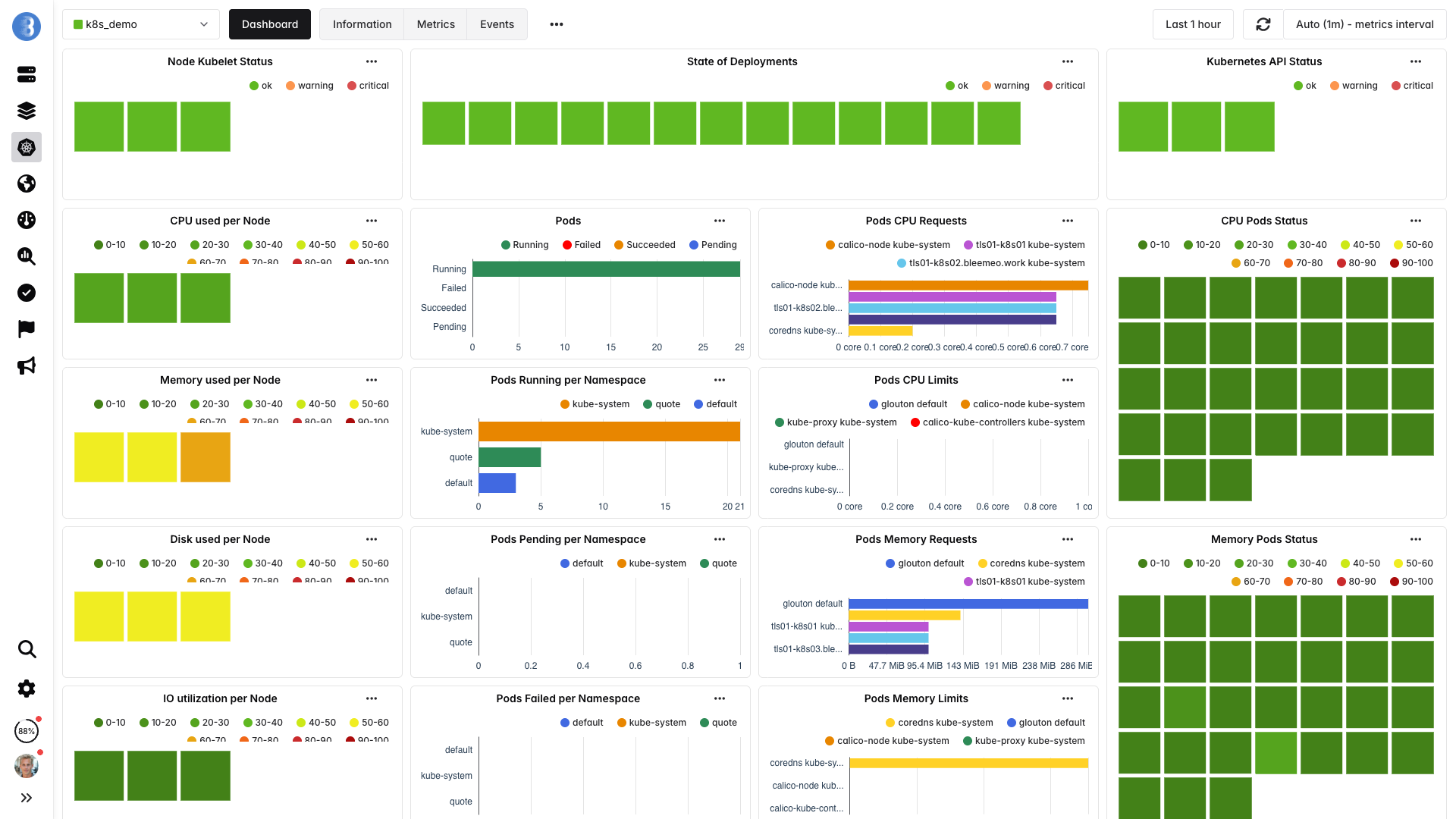
Why automatic discovery matters in Kubernetes
In a Kubernetes environment, workloads are constantly created, moved, and destroyed. Manual monitoring configuration can't keep pace. Automatic discovery means every new deployment, StatefulSet replica, or CronJob pod is monitored the instant it starts — with zero human intervention.
Dashboards & Alerts — Ready
Pre-built dashboards and smart alert rules activate the moment services are discovered. You're monitoring in production — not building a monitoring platform.
- Cluster-level overview: node count, pod status, resource usage
- Per-pod dashboards: CPU, memory, restarts, network
- Alert examples: pod crash loops, high node CPU, disk pressure
- Notifications via Slack, Teams, PagerDuty, email, webhooks
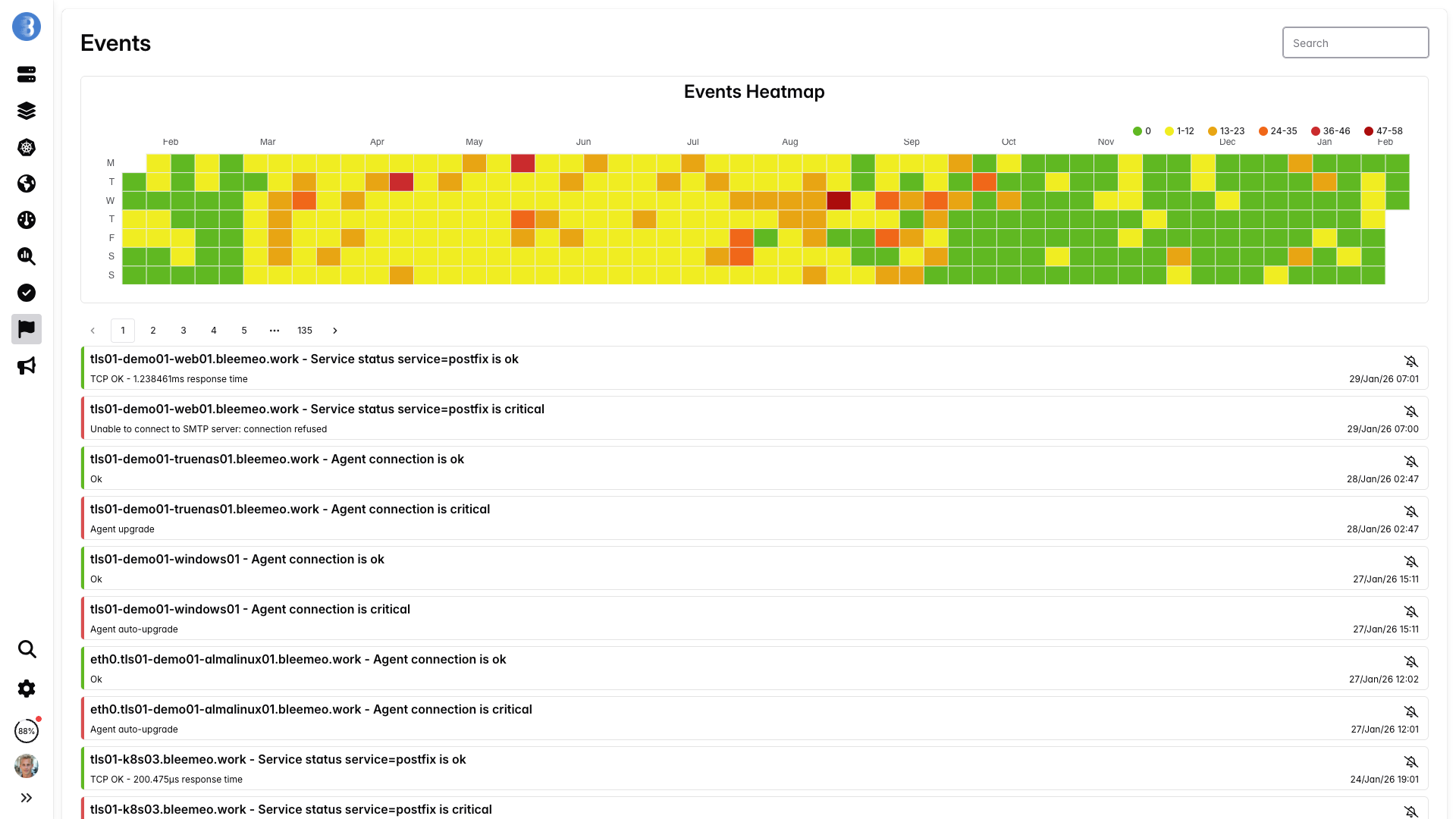
Why pre-built alerts save you hours
Writing good Kubernetes alert rules from scratch is surprisingly hard. You need to handle pod phases, container states, resource pressure conditions, and avoid noisy false positives during rolling deployments. Bleemeo ships with battle-tested defaults so you start with reliable alerts on day one — and you can always customize them later.
What You Monitor Out of the Box
Everything discovered automatically — no custom queries, no manual setup.
Kubernetes introduces multiple layers of abstraction — clusters, nodes, pods, containers, and the services running inside them. Effective monitoring means covering every layer, because a problem at one level (say, node disk pressure) cascades into symptoms at another (pod evictions, application errors). Bleemeo monitors all of these layers out of the box, so you see both the root cause and the impact in a single dashboard.
| Layer | Key Metrics | Example Alerts |
|---|---|---|
| Cluster | Node count, pod capacity, resource allocation | Cluster node not ready |
| Nodes | CPU, memory, disk, network per node | Node CPU > 90%, disk pressure |
| Pods | Status, restarts, CPU/memory requests vs. usage | Pod crash loop, OOMKilled |
| Containers | CPU throttling, memory limits, filesystem I/O | Container memory > 90% of limit |
| Services | MySQL queries/s, Redis latency, Nginx req/s, etc. | Service-specific thresholds |
| Network | Bytes in/out, packet errors, DNS resolution | High packet loss, DNS failures |
Why Bleemeo for Kubernetes
Purpose-built for dynamic, containerized environments.
Zero Configuration
No scrape configs, no ServiceMonitors, no annotations. Glouton discovers everything by watching the Kubernetes API — so new deployments are monitored automatically.
Instant Visibility
Metrics appear within seconds of agent deployment. Pre-built dashboards give you cluster, node, and pod views without building a single panel.
Multi-Cluster Ready
Deploy the same Helm chart across staging, production, and edge clusters. All data flows into a single pane of glass — no federation required.
Smart Alerts
Battle-tested alert rules for crash loops, OOMKills, node pressure, and more — active from minute one. Route notifications to Slack, Teams, PagerDuty, or email.
Lightweight Agent
Glouton uses under 100 MB of memory per node. Resource limits are pre-set in the Helm chart, so the agent never competes with your workloads.
Full Stack Coverage
From cluster-level capacity to per-container CPU throttling and application-layer metrics like MySQL queries or Redis latency — one agent covers it all.
Bleemeo vs. DIY Prometheus Stack
What it actually takes to monitor Kubernetes
| Aspect | DIY Prometheus | Bleemeo |
|---|---|---|
| Setup time | Days to weeks | 10 minutes |
| Configuration | Scrape configs, recording rules, alert rules | Zero config — automatic discovery |
| Dashboards | Build from scratch in Grafana | Pre-built, auto-activated |
| Storage & retention | Manage Thanos/Cortex/Mimir | Fully managed, included |
| High availability | Duplicate stacks + federation | Built-in redundancy |
| New service support | Find exporter, add scrape config | Detected in seconds |
| Ongoing maintenance | Version upgrades, capacity planning | None — fully managed SaaS |
Already invested in Prometheus? Bleemeo is built for Prometheus users — keep your PromQL queries and Grafana dashboards, lose the operational burden.
Built for Prometheus Users
Already using Prometheus? Bleemeo collects the same metrics you're used to and exposes them through a PromQL-compatible query interface. Keep your existing Grafana dashboards and alerting logic — without maintaining Prometheus infrastructure yourself.
Learn About Prometheus in the Cloud










Trusted by teams running Kubernetes in production
Engineers and CTOs trust Bleemeo to monitor their infrastructure
During a short lunch break we installed Bleemeo, created a custom metric, tested alerts, and were ready for production. The speed of deployment is remarkable.
Bleemeo support is simply legendary — fast, knowledgeable, and always there when we need it.
Bleemeo was incredibly fast to deploy. In about an hour we rolled it out across more than 100 servers and immediately gained full visibility into our infrastructure.
We set up monitoring for all our servers in just a few hours. The dashboard is clear, powerful, and genuinely enjoyable to use.
We deployed Bleemeo across our server infrastructure in only a few hours. Uptime monitoring now alerts us instantly whenever a service encounters an issue.
Our Prometheus + Grafana stack had become a maintenance project. With Bleemeo we deployed the agent in minutes and finally focused on using monitoring instead of maintaining it.
After installing the agent, Bleemeo automatically discovered our databases, containers, and services. Within an hour we had full infrastructure visibility — no dashboards or exporters to build.
Bleemeo replaced several monitoring tools with a single platform. Metrics, alerts, and logs are now in one place, saving our team significant time.
Bleemeo gave us immediate insight into our infrastructure without the usual complexity. Within a couple of hours we had metrics, alerts, and dashboards running smoothly.
Setting up Bleemeo was refreshingly simple. The agent deployment took minutes and the automatic discovery saved us days of configuration.
Thanks to Bleemeo, our team now detects issues before our users notice them. The alerting is reliable and the interface makes troubleshooting much faster.
Moving to Bleemeo simplified our monitoring stack dramatically. Instead of managing multiple tools, everything we need is available in a single platform.
Centralizing our logs in Bleemeo drastically simplified troubleshooting. Instead of jumping between tools, we can now correlate metrics and logs instantly to understand what's happening.
Bleemeo made Kubernetes monitoring surprisingly easy. Within minutes we had visibility into our clusters, pods, and workloads without having to build complex dashboards ourselves.
Ready to Monitor Kubernetes in 10 Minutes?
One Helm chart. Full observability. No maintenance. Start your free trial today.
15-day free trial · No credit card required · Cancel anytime
Frequently Asked Questions
Does Bleemeo work with managed Kubernetes services like EKS, GKE, and AKS?
Yes. Bleemeo works with any Kubernetes distribution including Amazon EKS, Google GKE, Azure AKS, and self-managed clusters. The Helm chart deploys a DaemonSet that runs on every node regardless of the underlying infrastructure.
How does Bleemeo discover new pods and services?
The Glouton agent watches the Kubernetes API for pod lifecycle events. When a new pod starts, Bleemeo automatically detects the running services (databases, web servers, message brokers, etc.) and begins collecting metrics — no annotation or label configuration required.
Can I send Kubernetes metrics to my existing Prometheus setup?
Yes. Bleemeo collects the same metrics Prometheus users expect and exposes them through a PromQL-compatible query interface. You can keep your existing Grafana dashboards and alerting logic. Learn more about Prometheus in the Cloud.
What resources does the Bleemeo agent consume?
The Glouton agent is lightweight by design. It typically uses less than 100 MB of memory and minimal CPU. Resource requests and limits are pre-configured in the Helm chart so the agent never impacts your workloads.
Do I need to configure anything after installing the Helm chart?
No. Once deployed, Glouton automatically discovers nodes, pods, containers, and services. Dashboards and alert rules are activated instantly. You can optionally customize thresholds or add notification channels, but the defaults cover the most common use cases.
Can I monitor multiple Kubernetes clusters from a single account?
Yes. Install the Helm chart on each cluster using the same account credentials. All clusters report to the same Bleemeo dashboard, giving you a unified view across staging, production, and edge environments — without any federation setup.
How do Helm chart upgrades work?
Upgrading is a single command: helm upgrade bleemeo-agent bleemeo/bleemeo-agent. The DaemonSet performs a rolling update so agent pods are replaced one node at a time with zero monitoring gaps. No data is lost during the upgrade.
Can Bleemeo monitor services running outside Kubernetes as well?
Yes. Bleemeo's Glouton agent also runs on bare-metal servers, virtual machines, and cloud instances. You can monitor your entire infrastructure — Kubernetes and non-Kubernetes — from the same dashboard with the same alerting rules.
Does Bleemeo support Kubernetes namespace-level monitoring?
Yes. Bleemeo automatically groups metrics by namespace, giving you per-namespace dashboards and the ability to set alerts scoped to specific namespaces. This is especially useful for multi-tenant clusters where teams need visibility into their own workloads.
What happens if a node goes down?
When a node becomes unreachable, Bleemeo detects the loss of heartbeat within minutes and triggers alerts. All pods that were running on that node are flagged, and their status is reflected in your dashboards. Once the node recovers or pods are rescheduled, monitoring resumes automatically.