Glouton Monitoring Agent
A lightweight, efficient monitoring agent written in Go. Collect system and application metrics with minimal resource usage and send them to Bleemeo or any compatible platform.
Features
Why Glouton?
Lightweight & Fast
Written in Go for maximum performance with minimal resource usage. Typically uses less than 50MB of RAM.
Easy to Deploy
One-line installation on Linux, Docker, Kubernetes, and Windows. Configuration through simple YAML files.
Secure by Design
TLS encryption for all communications. No incoming connections required, works behind firewalls.
Comprehensive Monitoring
Monitors system resources, Docker containers, services, and custom metrics out of the box.
Architecture
How Glouton Works
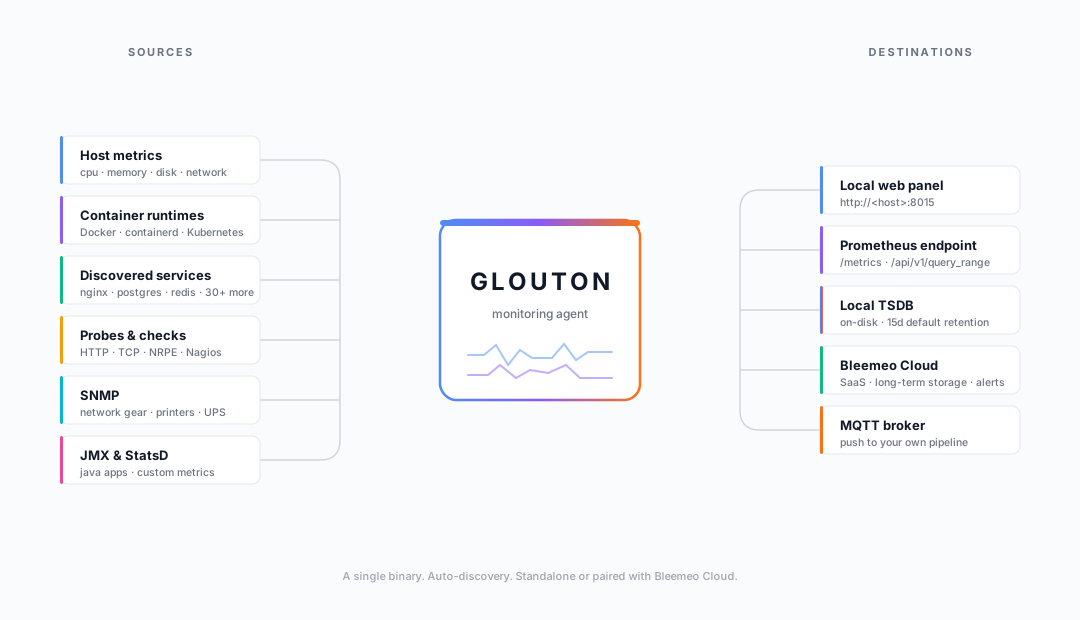
One binary auto-discovers your services, collects and stores metrics in an embedded TSDB, surfaces them in a live local panel and a Prometheus-compatible API, and optionally forwards everything to Bleemeo Cloud or your own MQTT broker.
Local panel
A Live Panel, Out of the Box
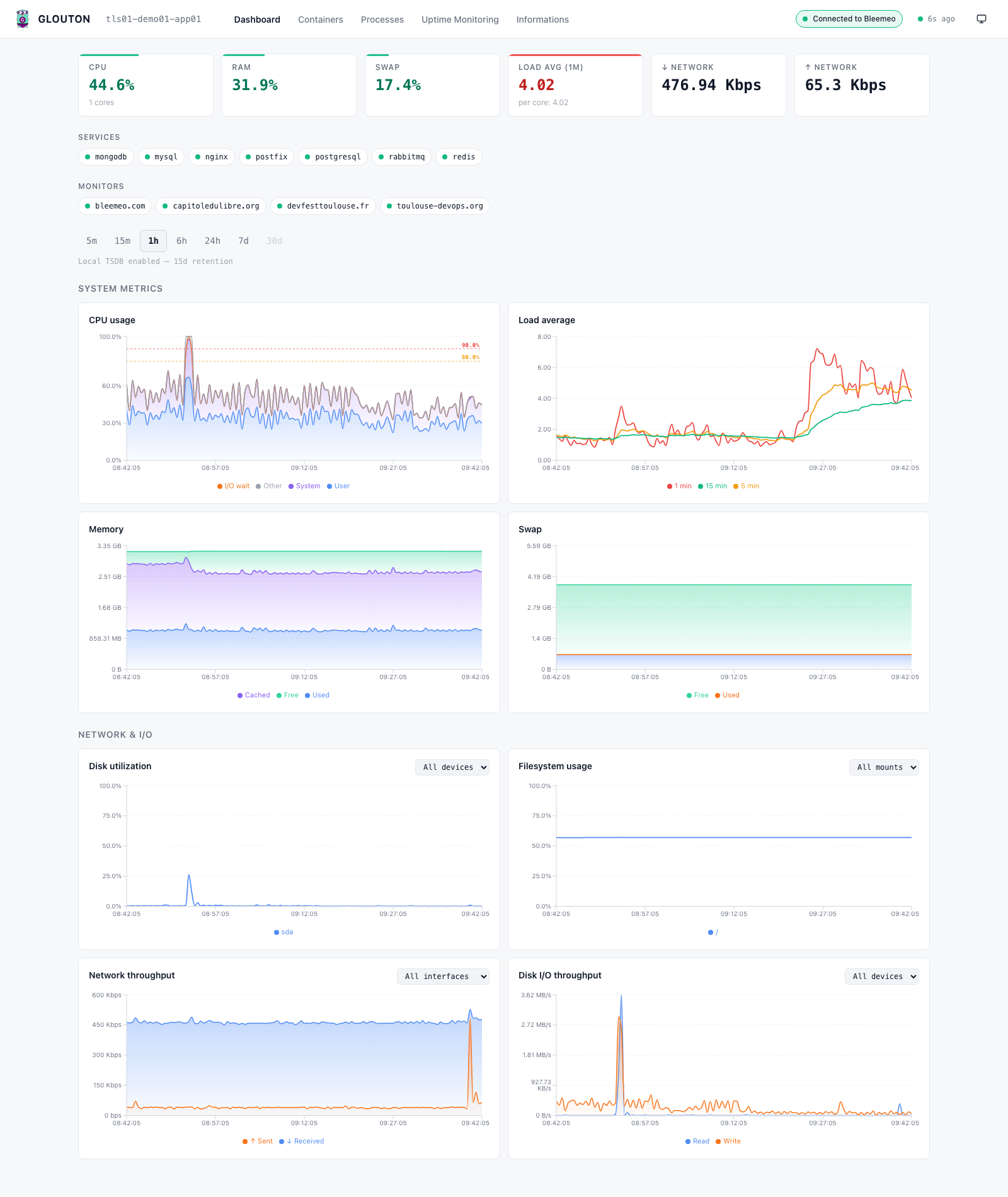
Every agent serves a status-first web panel at localhost:8015 — KPI cards, a discovered-services row and range-aware system, network and I/O charts, powered by the built-in TSDB. No account required.
Install
Quick Installation
Linux (Debian/Ubuntu)
curl -fsSL https://get.bleemeo.com | shOr using apt:
wget -O- https://packages.bleemeo.com/bleemeo.gpg | sudo apt-key add -
echo "deb https://packages.bleemeo.com/debian stable main" | sudo tee /etc/apt/sources.list.d/bleemeo.list
sudo apt update && sudo apt install glouton
Docker
docker run -d --name glouton \
  --net host --pid host \
  --privileged \
  -v /var/lib/glouton:/var/lib/glouton \
  -v /var/run/docker.sock:/var/run/docker.sock \
  -e BLEEMEO_ACCOUNT_ID=your-account-id \
  -e BLEEMEO_REGISTRATION_KEY=your-registration-key \
  bleemeo/glouton
Kubernetes
kubectl create namespace bleemeo
kubectl create secret generic bleemeo-secret \
  --from-literal=account-id=your-account-id \
  --from-literal=registration-key=your-key \
  -n bleemeo
kubectl apply -f https://packages.bleemeo.com/kubernetes/glouton-daemonset.yaml
Footprint
Light on Resources
Capabilities
What Glouton Monitors
System Metrics
- CPU usage and load average
- Memory and swap usage
- Disk I/O and space
- Network traffic and connections
- System processes
Docker Containers
- Container resource usage
- Container status and health
- Image and registry information
- Network and volume metrics
Services & Applications
- Apache, Nginx, HAProxy
- PostgreSQL, MySQL, MongoDB
- Redis, Memcached, Elasticsearch
- RabbitMQ, Kafka
- Custom application metrics
Integrations
- Prometheus exporter
- StatsD receiver
- SNMP monitoring
- Custom checks and scripts
- REST API endpoints
Join the Community
Glouton is open source and actively maintained. We welcome contributions, bug reports, and feature requests from the community.